Narwhal Shoes
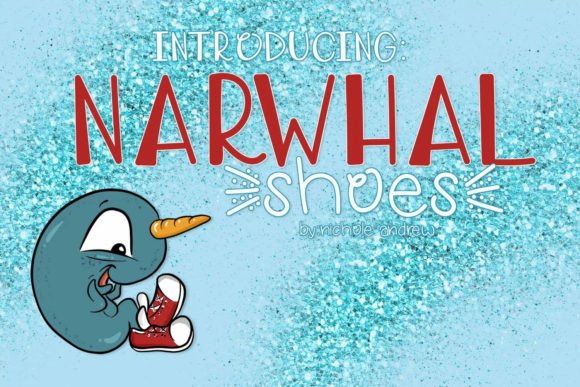
Narwhal Shoes is a playful, hand-drawn script font designed for creators who need expressive typography that feels personal but remains highly functional. It’s not just decorative—it’s engineered for real-world use across digital and physical outputs. Whether you’re designing a logo, prepping files for a vinyl cutter, or crafting social media graphics, Narwhal Shoes delivers character without sacrificing precision.
What sets Narwhal Shoes apart isn’t just its whimsical baseline or natural stroke variation—it’s the thoughtful inclusion of alternate glyphs and swashes. These aren’t afterthoughts; they’re built into the font file as OpenType features, ready to activate in compatible software like Adobe Illustrator, Affinity Designer, or even modern versions of Canva and Cricut Design Space. That means you don’t need to manually swap characters—you get intelligent, context-aware flourishes that respond to your typing.
Where Narwhal Shoes Fits Into Your Creative Workflow
Most fonts enter a project at one point—usually near the end, during polish. Narwhal Shoes works differently. Because it’s both expressive and production-ready, it often becomes part of the *planning* phase. For example, when brainstorming a brand identity for a new small business, designers sometimes sketch concepts using Narwhal Shoes early on—not because it’s final, but because its energy helps clarify tone before committing to color palettes or layouts. Its rhythm suggests warmth, approachability, and a touch of irreverence—qualities that shape decisions downstream.
During execution, Narwhal Shoes shines where legibility meets personality: product labels, handmade packaging, workshop signage, or event invitations. Its generous x-height and open counters ensure readability even at smaller sizes, while its swash capitals add distinction to headlines or monograms. If you're preparing files for a cutting machine—like a Cricut, Silhouette, or Glowforge—you’ll appreciate how cleanly its outlines convert to vector paths. No jagged edges, no unexpected overlaps. Just smooth, cuttable curves that translate reliably from screen to material.
Integration With Tools You Already Use
Narwhal Shoes integrates seamlessly with common design and production tools—but only if you know how to access its full potential. In vector-based apps, enable OpenType features (look for “Swash,” “Stylistic Alternates,” or “Contextual Alternates” in the Character or Glyphs panel). In Cricut Design Space, use the “Text” tool and toggle “Font Features” on—then type normally; many swashes trigger automatically after certain letters (like an ‘a’ or ‘t’) or with the spacebar.
For educators and bloggers, Narwhal Shoes adds visual hierarchy without complexity. A lesson header in Narwhal Shoes—paired with a clean sans-serif body font—immediately signals “this is engaging, not formal.” It’s also ideal for printable planners or habit trackers where handwritten warmth encourages consistent use. Unlike free script fonts that lack spacing consistency or glyph coverage, Narwhal Shoes includes full Latin character sets, numerals, punctuation, and multilingual support—so it scales from English blog headers to bilingual event flyers.
Practical Tips for Consistent Results
- Test spacing first: Script fonts can tighten or loosen depending on letter combinations. Use the “Optical” kerning setting in Illustrator or manually adjust tracking between words—not individual letters—to maintain flow.
- Limit swash use to emphasis points: One or two well-placed swashes per line (e.g., the first and last letter of a headline) create impact without visual noise. Overuse dilutes effect and slows readability.
- Export SVGs, not PNGs, for cutting machines: SVG preserves vector integrity. Raster formats like PNG force the machine to trace edges, which can introduce inaccuracies—especially with fine swash terminals.
- Pair intentionally: Narwhal Shoes pairs best with neutral, geometric sans-serifs (e.g., Inter, Montserrat, or Work Sans) or soft serifs (like Literata or Lora). Avoid other scripts or overly decorative fonts—they compete rather than complement.
Preparing Files for Physical Output
If your project ends up on a physical surface—mugs, tote bags, embroidery patches, or laser-engraved wood—Narwhal Shoes holds up well, but preparation matters. Always outline text before sending to production. This converts live type into fixed vector shapes, preventing font substitution or rendering errors. In Illustrator, select the text and choose Type > Create Outlines. Then inspect anchor points: simplify if needed (Object > Path > Simplify), especially for intricate swashes that may generate excess nodes. Fewer points mean faster, cleaner cuts—and fewer chances for the machine to stall or misread a path.
For embroidery digitizing, avoid ultra-thin swash strokes. Most embroidery software interprets lines under 0.5mm as unsewable. Stick to bolder letterforms or simplify swashes manually before importing into Wilcom or Embrilliance. When in doubt, test-cut a small section on scrap material first—especially with layered vinyl or heat-transfer applications.
Long-Term Usability and Brand Alignment
A font isn’t just a one-off choice—it’s a recurring asset. Narwhal Shoes supports long-term use because it’s versatile enough to adapt across mediums without feeling out of place. A small business owner might start with Narwhal Shoes on Instagram story templates, then extend it to invoice headers, email signatures, and seasonal promo banners—all while maintaining recognizable voice. That consistency builds familiarity without requiring rigid lockups or complex guidelines.
It also ages well. Unlike trend-driven fonts that feel dated within months, Narwhal Shoes leans into timeless handwriting qualities—slight irregularity, organic weight shifts, and human-scale proportions. That makes it resilient against shifting platform aesthetics or algorithmic preferences. Search engines and users alike respond well to authentic, coherent presentation—and Narwhal Shoes supports that coherence without demanding heavy customization.
Real-World Implementation Examples
- A freelance educator uses Narwhal Shoes for weekly worksheet headers. Students report higher engagement with materials that “feel friendly,” and the teacher saves time by reusing the same font family across Google Slides, PDF printouts, and Canva-based parent newsletters.
- A candle maker imports Narwhal Shoes into Cricut Design Space to cut custom labels. By enabling stylistic alternates, each batch gets subtle variation—making limited editions feel intentional, not repetitive.
- A podcast host creates episode thumbnails in Figma using Narwhal Shoes for titles and a monospace font for guest names. The contrast reinforces hierarchy while keeping the overall look cohesive and on-brand.
- A nonprofit runs a summer camp and uses Narwhal Shoes in their registration portal, printed name tags, and daily schedule boards. Staff note fewer questions about schedules—likely because the font’s clarity and warmth reduce cognitive load for kids and caregivers alike.
Ultimately, Narwhal Shoes works best when treated not as decoration, but as a deliberate communication tool. It doesn’t replace strategy—it sharpens it. Whether you’re mapping out a content calendar, prepping assets for a craft fair, or building a client’s visual identity system, Narwhal Shoes offers reliable expressiveness grounded in practical design logic. Its value isn’t in how flashy it looks alone, but in how smoothly it moves through your process—from idea to execution, screen to surface, concept to completion.