Bayshore Gardens: Elegant Handwritten Font
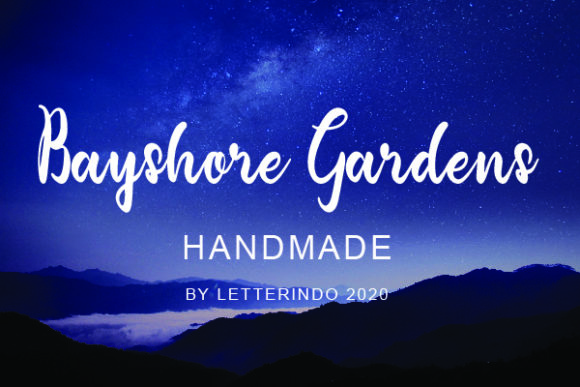
Bayshore Gardens isn’t just another script font—it’s a thoughtfully crafted handwritten typeface designed to feel both timeless and warmly personal. Imagine the graceful flow of ink on fine stationery, the subtle variation in stroke weight, the gentle rhythm of real penmanship—all preserved in digital form. That’s Bayshore Gardens: elegant without being stiff, classic without feeling distant, and friendly without sacrificing sophistication.
What Makes Bayshore Gardens Stand Out
At its core, Bayshore Gardens is a display font rooted in authentic calligraphy. Unlike overly ornate scripts that can overwhelm or generic handwriting fonts that lack personality, this one strikes a rare balance. Its letters connect smoothly but never force awkward joins. Uppercase characters carry presence and poise; lowercase forms invite readability and charm. Swashes are tasteful—not excessive—and alternate glyphs add quiet versatility for designers who want nuance without complexity.
It’s not built for body text or long paragraphs. Instead, Bayshore Gardens shines where first impressions matter: headlines, titles, short quotes, names, and focal phrases. That intentional focus makes it especially valuable for creators who need emotional resonance—not just legibility.
Who Benefits Most From This Font
Whether you’re planning your wedding, launching a small business, designing classroom materials, or sharing heartfelt moments online, Bayshore Gardens meets real needs with quiet confidence.
- Wedding planners and couples appreciate how effortlessly it elevates invitations, signage, and vow books—adding romance and refinement without looking clichéd.
- Small business owners (especially in wellness, boutique retail, or creative services) use it to soften branding—think café menus, product labels, or Instagram story headers that feel human, not algorithmic.
- Educators and parents choose it for classroom posters, award certificates, or birthday cards that celebrate individuality while keeping things warm and approachable.
- Bloggers and social media creators rely on it for quote graphics, newsletter banners, or Pinterest pins—where tone matters as much as content.
Real-World Uses You Can Try Today
You don’t need design experience to get started. Here are simple, effective ways to bring Bayshore Gardens into your projects:
- Create a minimalist wedding invitation suite using Bayshore Gardens for names and dates, paired with a clean sans-serif for details—elegant contrast, zero clutter.
- Design printable greeting cards for birthdays or thank-yous. A single line like “So grateful for you” in Bayshore Gardens feels more sincere than any stock template.
- Use it in Canva or Adobe Express to craft Instagram post headers—“New Collection Just Dropped” or “You Belong Here”—giving your feed a cohesive, handmade warmth.
- Print classroom affirmations (“You are capable,” “Your voice matters”) in Bayshore Gardens on pastel cardstock—students respond to the kindness embedded in the letterforms.
- Pair it with soft photography in a portfolio website header. It signals creativity and care before visitors even read a word.
A Note on Pairing and Practicality
Bayshore Gardens works best when given room to breathe. Avoid cramming it into tight spaces or shrinking it too far—it’s meant to be seen and felt, not scanned. For best results, pair it with neutral, highly readable fonts: a gentle sans-serif like Lato or Poppins, or a refined serif like Merriweather. These combinations keep hierarchy clear and tone consistent.
Also keep licensing in mind. Bayshore Gardens is typically offered for personal and commercial use—but always check the license included with your download. Some versions allow unlimited use across client work; others may require an extended license for resale items like printable planners or merch. When in doubt, review the terms directly from the source.
Why It Fits So Naturally Into Modern Life
In a world saturated with bold, geometric, and ultra-minimalist design, Bayshore Gardens offers something quietly essential: humanity. It doesn’t shout. It invites. It reminds us that connection starts with how something *feels*, not just how it looks.
That’s why it resonates across generations and contexts—from Gen Z creators building Etsy shops to seasoned educators updating bulletin boards. It supports intentionality: choosing words carefully, presenting them beautifully, honoring the person on the other side of the screen or envelope.
And because it’s digitally optimized, it performs well across devices. Whether embedded in a PDF invitation, rendered in a web banner, or exported as SVG for laser-cut signage, Bayshore Gardens retains its character without pixelation or distortion.
Getting Started Is Simple
No steep learning curve required. If you’ve ever typed in Word, Google Docs, or Canva, you already know how to use Bayshore Gardens. Install the .OTF or .TTF file on your computer, then select it from your font menu. Most design tools also let you upload it directly—even if you’re editing on mobile via apps like PicsArt or Over.
Beginners often start by replacing default headings in templates. Try swapping “Congratulations!” in a graduation card or “Welcome Home” on a welcome sign. Instant upgrade—no design degree needed.
Before You Choose: A Few Gentle Reminders
While Bayshore Gardens brings undeniable charm, it’s worth considering context. It’s not ideal for legal disclaimers, data tables, or multilingual content with complex diacritics—stick to languages it supports (primarily English and Western European). Also, avoid overusing it across every element of a layout; restraint helps it retain impact.
If you’re working on brand identity, test it at different sizes and backgrounds. Does it hold up on dark mode? Does it still feel warm on recycled paper? Small tests like these prevent surprises later—and help you honor the font’s intent: to enhance meaning, not distract from it.
Ultimately, Bayshore Gardens isn’t about chasing trends. It’s about finding a visual voice that aligns with your values—thoughtful, graceful, grounded in authenticity. Whether you're handwriting love notes or launching a new service, it helps you say what matters—in a way that feels true.